Comparison
Proton Mail vs Tuta Mail
Compare the facts. Check the scope. Choose what fits.
- Documented differences
- 1
- Same documented value
- 3
- Need more evidence
- 19


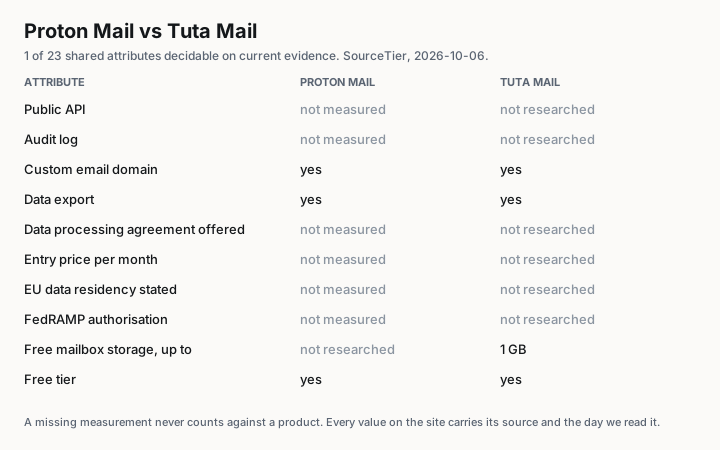
At a glance
Differences, not an overall rankingExplore the evidence
Open a row for sources and plan limitsNo differences are documented on both sides yet. Check the research gaps or select All.
No comparable values are documented on both sides yet. Select Research gaps or All.
No research gaps in these criteria. Select Documented or All to see the values.
Pricing
Sources for this row
Proton Free is a continuing free plan for one user. Paid plans add mailbox capacity and custom domains.
A continuing Free personal plan is listed separately from the paid Revolutionary and Legend plans.
Security and compliance
Platform and integration
Sources for this row
Custom domains require a paid Proton Mail plan and DNS configuration. They are not included in Proton Free.
Custom domains are available on paid subscriptions. Check the domain count for the selected plan.
Sources for this row
The Export Tool is available to all users on Windows, macOS and Linux. It exports decrypted mail; it does not export Calendar, Drive or Pass data.
Mailbox export is available in the Tuta desktop client. Choose the mailbox and destination folder in Email Export settings.
Sources for this row
The Free personal plan lists 1 GB of storage. Paid plans have different allowances.
Sources for this row
A paid Proton Mail plan and the local Bridge app are required. Bridge connects supported desktop email clients; it is not a mobile IMAP service.
Tuta documents its own desktop, web and mobile apps rather than standard mail protocols. The mentioned Thunderbird add-ons do not add IMAP support.
Sources for this row
Tuta documents its own apps for Android and iOS, alongside its web and desktop clients.